Asynchronous collaboration is more than replying later. It means people can continue meaningful work without having to be online at the same time or follow every conversation in real time.
That breaks down when every discussion, request, decision, and task shares one chat stream. What was decided, what is still open, and why — all of it gets harder to recover.
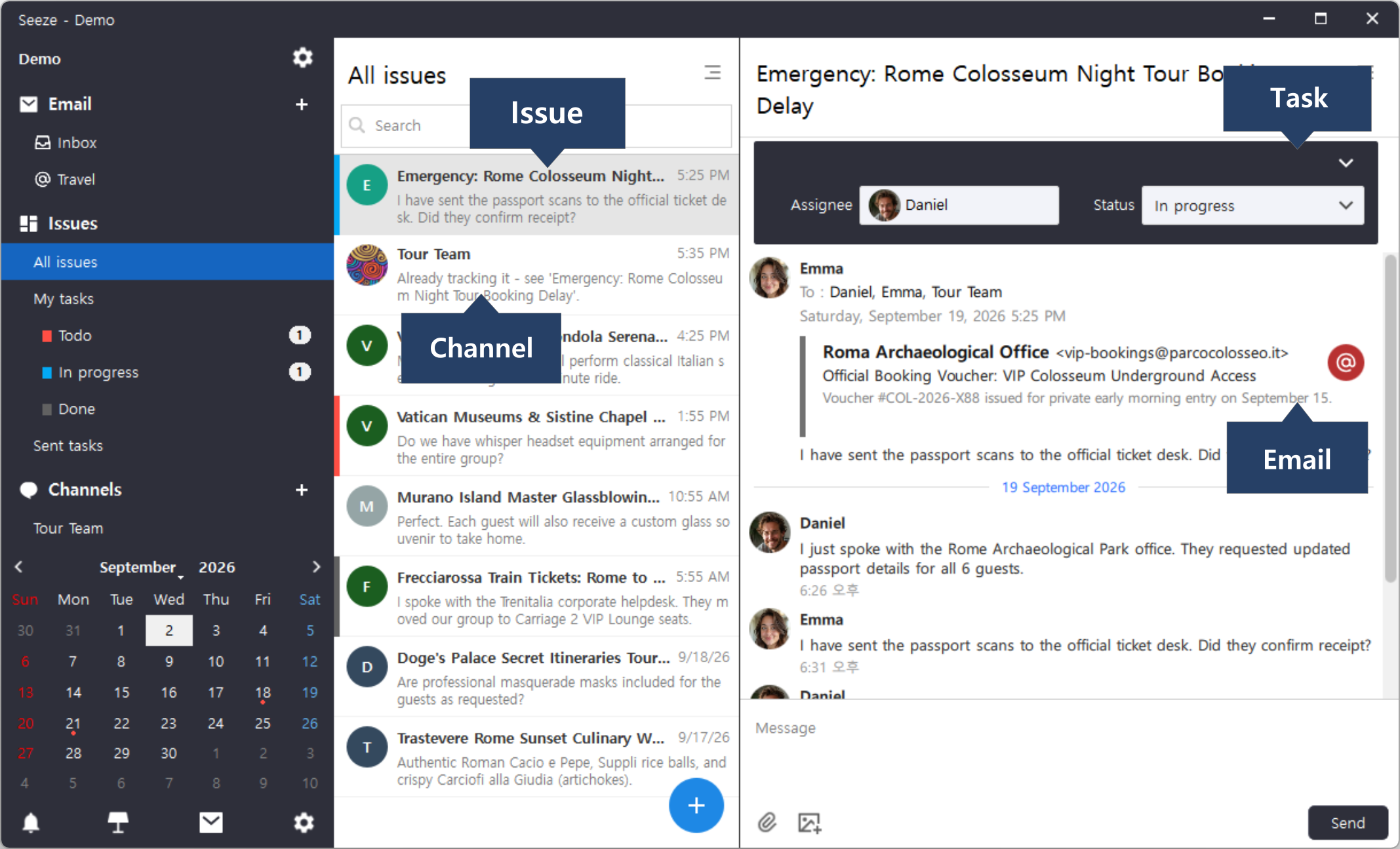
The screenshot above is one Issue: a delayed Colosseum tour booking.
The vendor's original email sits at the top — sender, subject, voucher number — not a summary someone pasted in. Above it, the Task carries its owner and its status. Below it, the team keeps talking.
Now look at the Channel. When someone raised the same booking in Tour Team, the reply was a pointer: "Already tracking it — see 'Emergency: Rome Colosseum Night Tour Booking Delay.'" The Channel stayed a Channel. The work stayed in its Issue.
That is the difference a reply thread cannot make. A thread keeps a conversation next to other conversations. An Issue Thread keeps a conversation next to the work it belongs to — the request it came from, the person who owns it, and where it stands right now.
Let people talk freely in Channels, but move real work into focused Issue Threads.
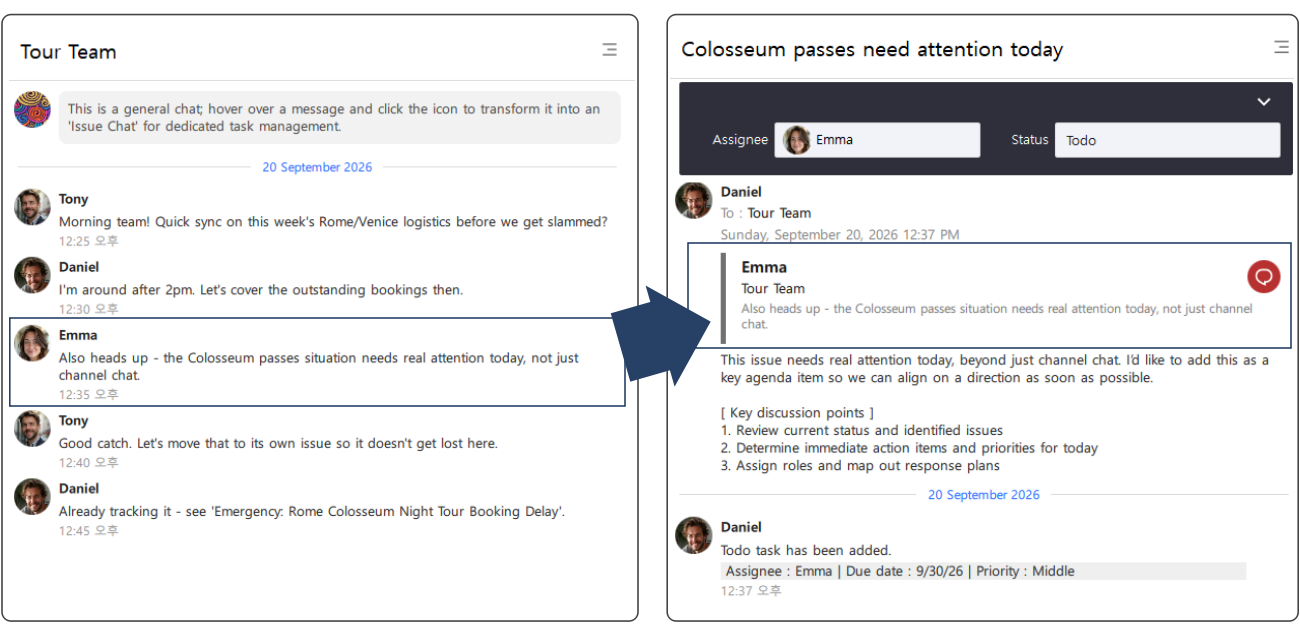
On the left is a Channel — the team's open conversation. When Emma flags something that needs more than channel chat, that single message becomes an Issue Thread, shown on the right. Her original message is carried in as the anchor, so the new Thread opens with the words that created it rather than someone's summary of them.
Traditional team messengers are built around real-time chronological streams, so new messages keep pushing older ones down. People stay available because a decision might happen while they are away. This is where chat fatigue, notification overload, and context switching cost start eating into deep work. (Read why team chat loses project context →)
Seeze separates open conversation from focused work.
Channels are designed for free-form team communication. Team members can ask questions, exchange ideas, share information, and explore problems without having to turn every message into a Task. Not every conversation needs to become an Issue. The important moment is when a discussion becomes something that requires focused follow-up.
An Issue Thread is not a reply thread inside a Channel. It is a separate space for one piece of work. Each Issue has its own dedicated conversation centered around one specific piece of work. The discussion, decisions, files, and progress related to that Task remain together instead of being mixed with unrelated conversations.
An Issue Thread can be created directly from a chat message. It can also be created using an email as the anchor, allowing the team to discuss an external request while keeping the original email connected to the Issue Thread. When an Issue Thread is created from a chat message, AI automatically generates the Issue title.
The goal is simple: keep the conversation open, but keep the work focused.
Not every message should become a Task immediately. Sometimes a team needs to discuss a problem, evaluate options, and reach agreement before deciding what should actually be done. Seeze supports both moments: an Issue can have a Task created when the work is clear from the beginning, or a Task can be added after sufficient discussion and team agreement.
A specific message can also be converted into an Issue when a conversation identifies a concrete piece of work. This turns message-to-task conversion into a practical part of asynchronous collaboration, without requiring every conversation to become structured work from the beginning.
Important work often starts outside the team's internal chat. A customer request may arrive by email. A partner may send an attachment. A teammate may raise an issue in a casual chat conversation. Without a unified workflow, teams often have to move information manually between email, chat, and task-management tools. Seeze connects these entry points to the Issue workflow.
The original communication becomes the starting context for the Issue rather than a separate piece of information that has to be copied and explained again. This helps reduce app switching and preserves the relationship between the original request and the work that follows.
Asynchronous collaboration also requires visibility into when work needs to happen. When a Task has a due date, that deadline is reflected in the calendar. Selecting a specific date allows team members to see the Issues associated with the work scheduled for that day. This provides another useful perspective:
Issue view: What is the work and why does it exist?
Calendar view: When does the work need to happen?
Because the calendar is connected to the Task and the Task is connected to the Issue, scheduling does not have to become another disconnected system.
Asynchronous collaboration does not mean people communicate less. It means people do not need to interrupt deep work to stay present in every conversation. With Seeze:
Each person can join the work when they are ready, understand the context that has already been established, and continue from there without requiring everyone else to be online at the same time. The result is a different kind of collaboration, one that stays open when conversation is needed, focused when work begins, and persistent when people need to return later.
Related reading: