Why Tasks Are Optional

"Too rigid." Traditional task management often feels that way. Many task tools assume that work should begin with a structured ticket: create a task, assign it to someone, set a status, add a priority, define a deadline, and move it through a workflow.

But real work does not always begin that way. Sometimes, people need to talk first: to understand the problem, share context, ask questions, explore options, and decide whether the work is actually necessary.

A Task Does Not Have to Exist at the Start

In Seeze, an Issue is not a ticket you file. It is where one piece of work lives, and it starts as nothing more than a focused conversation. Seeze does not force a Task to be created when an Issue Thread is opened. When the discussion makes it clear that a concrete piece of work is needed, a Task can be added to the Issue. If the team later decides that the work is no longer necessary, the Task can also be removed.
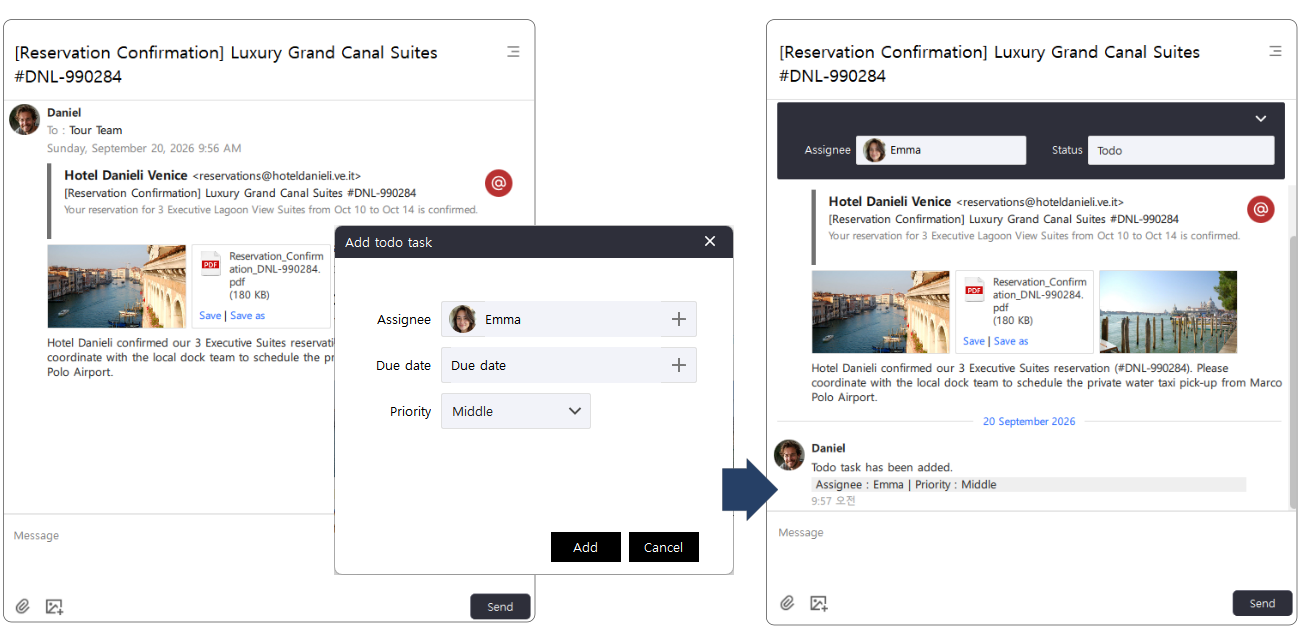
An Issue Thread with no Task on the left, and the same Issue carrying an attached Task on the right after one is added

On the left, the Issue is still just a conversation — a hotel confirmation, its PDF, and what needs to happen next. There is no Task, and nothing forcing one. When the work becomes clear, a Task is attached, and the Issue carries it from then on. Notice the due date left blank: assignee, due date, and priority are all optional.

This makes the Task feel less like a ticket that must be created and more like a work object attached when it becomes necessary.
A Task Works Like a File Attachment

A useful way to think about a Seeze Task is as similar to a file attachment. You do not create an attachment before you know whether you need a file. You start the conversation, and when the file becomes relevant, you attach it.

A Seeze Task works in much the same way. The Issue Thread is where the team discusses the work. The Task is attached when the discussion produces a clear action.

This is literal, not just a metaphor. A Task is attached from the Issue menu and taken off from the same place: Add task when the Issue has none, Remove task once it does. Attach it, or remove it, exactly as you would with a file. The assignee, the due date, and the priority are all fields you may leave empty.

The Task does not replace the conversation. It adds an execution layer to it. This keeps the workflow lightweight while still providing the structure needed for ownership, deadlines, and execution.

From Forced Tickets to Collaborative Commitment

Traditional task management often starts with assignment:

Approach Flow
Traditional Create Ticket → Assign Person → Notify → Execute
Seeze Discuss → Understand → Agree → Attach Task → Execute

Work is not always something that can be handed over by assignment alone. A person may need more context before accepting a task. The requirements may still be unclear. Another solution may emerge during discussion. Or the team may discover that the work is no longer necessary.

Seeze treats these moments as part of the collaboration process rather than exceptions to a rigid task workflow. A Task can be created when the people involved understand what needs to happen and agree that it should happen.

People are not machines waiting for the next ticket.

Good collaboration gives people the context to understand the work before asking them to execute it. The objective is not to eliminate ownership or accountability. It is to make sure that ownership follows understanding.

Lightweight Does Not Mean Unstructured

A lightweight Task is not a task without structure. Once attached, the Task can still carry an assignee, a due date, and a priority — everything needed to execute the work.

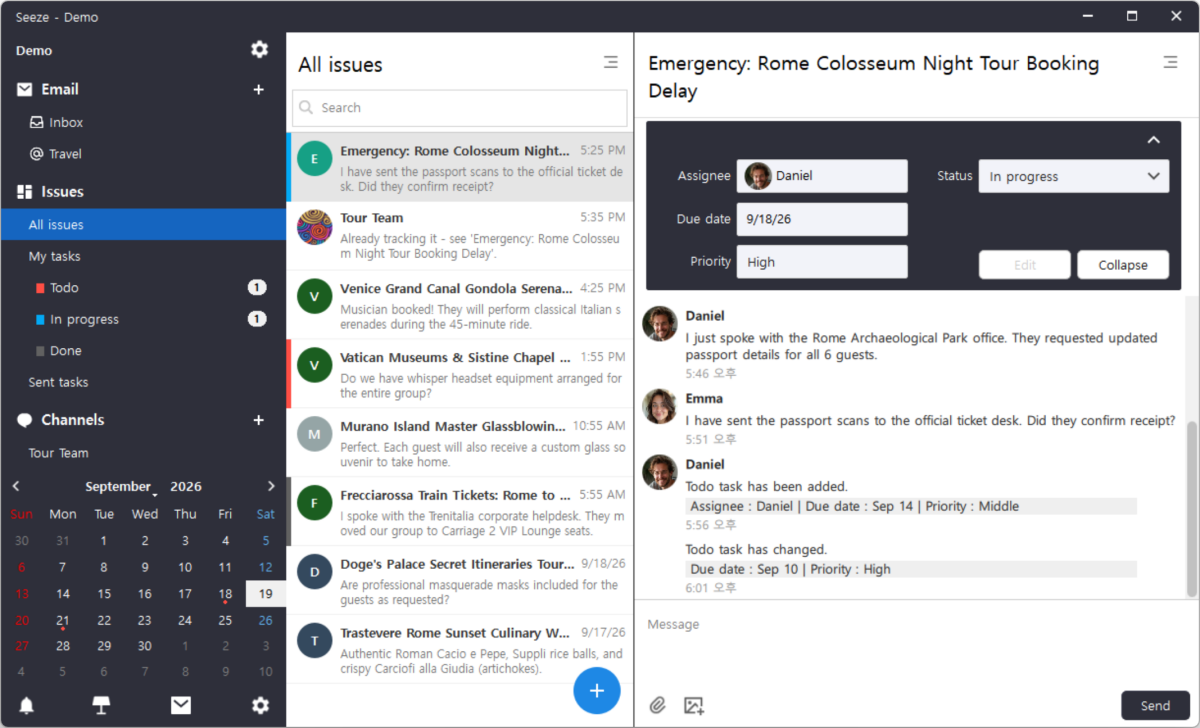
From there it behaves like any tracked piece of work. Each Task moves through To-do → In Progress → Done, and every person has both a My Tasks view for the work assigned to them and a Sent Tasks view for the work they have handed to others. A due date lands on the calendar next to everything else scheduled that day.

Seeze Issue Thread with an attached Task showing assignee, due date, priority, and status, beside the My Tasks and Sent Tasks sidebar

Every change stays in the Thread. When the due date moved and the priority went up, the Issue recorded it in line with the conversation that caused it.

The difference is not whether structure exists. The difference is when that structure is introduced. Seeze puts conversation first and structured execution where it is actually needed, so teams can keep discussions natural without sacrificing accountability.

Talk first. Attach the work when it becomes clear.

Related reading: